quote
March • 2013
"Hi, Xbox"
Abstract
Product and systematic design
I helped crafting the new design language for Xbox, designing key screens, definining UX patterns and documenting the visual language along the way.
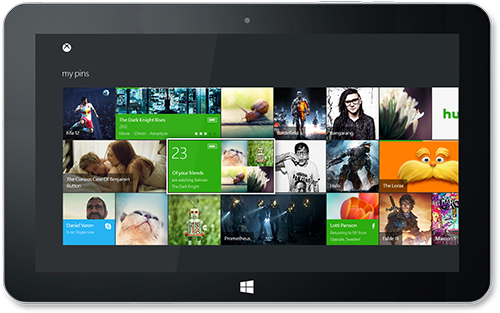
I helped crafting the new design language for Xbox, designing key screens, definining UX patterns and documenting the visual language along the way.
Using face recongnition through Kinect your experience with Xbox One is ininterrupted. Seamlessly log into your account just by walking in front of the console. Resume your latest activities by scrolling through the list of recent items on the left hand side.


Pins are like bookmarks in the Xbox ecosystem. Collect a variety items from different content sources under the same roof. We explored different arrangements, from organic grids based on popularity, to semantic zoom approaches that favorite grouping items by category.


Playback is a crucial part of the user experience. We wanted to make enjoying your favorite movie or dancing to a shared playlist on Spotify as immersive and exciting as possible.

Media fruition is tailored to each media type and conveys an enveloping experience where content is on the forefront and the interface appears only when necessary.

Its not just about playing games anymore. That's why we designed the visual language to allow for enough flexibility to suit the moods of each media type you're playing. From immersing yourself into a 3D movie, to singing along to your favorite jams.
Leveraging the extensive Xbox catalog, we devised a smart system which always offers the users suggestions on you what do enjoy next: you just have to press x.


The vast array of media types that are part of the Xbox ecosystem share components internally known as common contros. We designed those to be simple and lightweight and never detract from content.

We wanted to make browsing as quick and intuitive as possible. Xbox offers a vast catalog, but we know users want to find something to watch fast and efficiently. That's why we designed a progressive disclosure flow, which allows for media to be accessed at each point of the journey, either via an explicit UI element, or a shortcut on the joypad.


Filling in input fields in a 10-foot experience is one of the most challenging user experience points. That's why with Xbox One we favorite dictation instead. Use your voice to find anything in the catalog. Further refine your search results using the pivot points at the top of the screen — hit play and enjoy your movie.


As Cortana is becoming a much more agnostic feature across all Windows platforms, voice recognition is a very simple and straightfoward way to navigate the system, or take shortcuts.
The design system behind had to be meticolously documented in order to provide the necessary guidance to both internal and third party developers.


The styleguide document was organized into nine discreet chapters, diving in depth into the design specifications of each. All designs were provided with quotes, a variety of interaction states and sidenotes.
The conceptual and technical aspects (all designs were rendered in Illustrator as part of a pixel density-agnostic approach) of the body of work presented here constitued the founding platform for a broader design system, which will be developed and further integrated by the whole Microsoft digital ecosystem.
